Mastering Drift: The Ultimate Steering Wheel Setup
So, you want to master drifting with a steering wheel? The quick answer is: it’s all about fine-tuning your force feedback, wheel rotation, and pedal settings to mimic real-w…
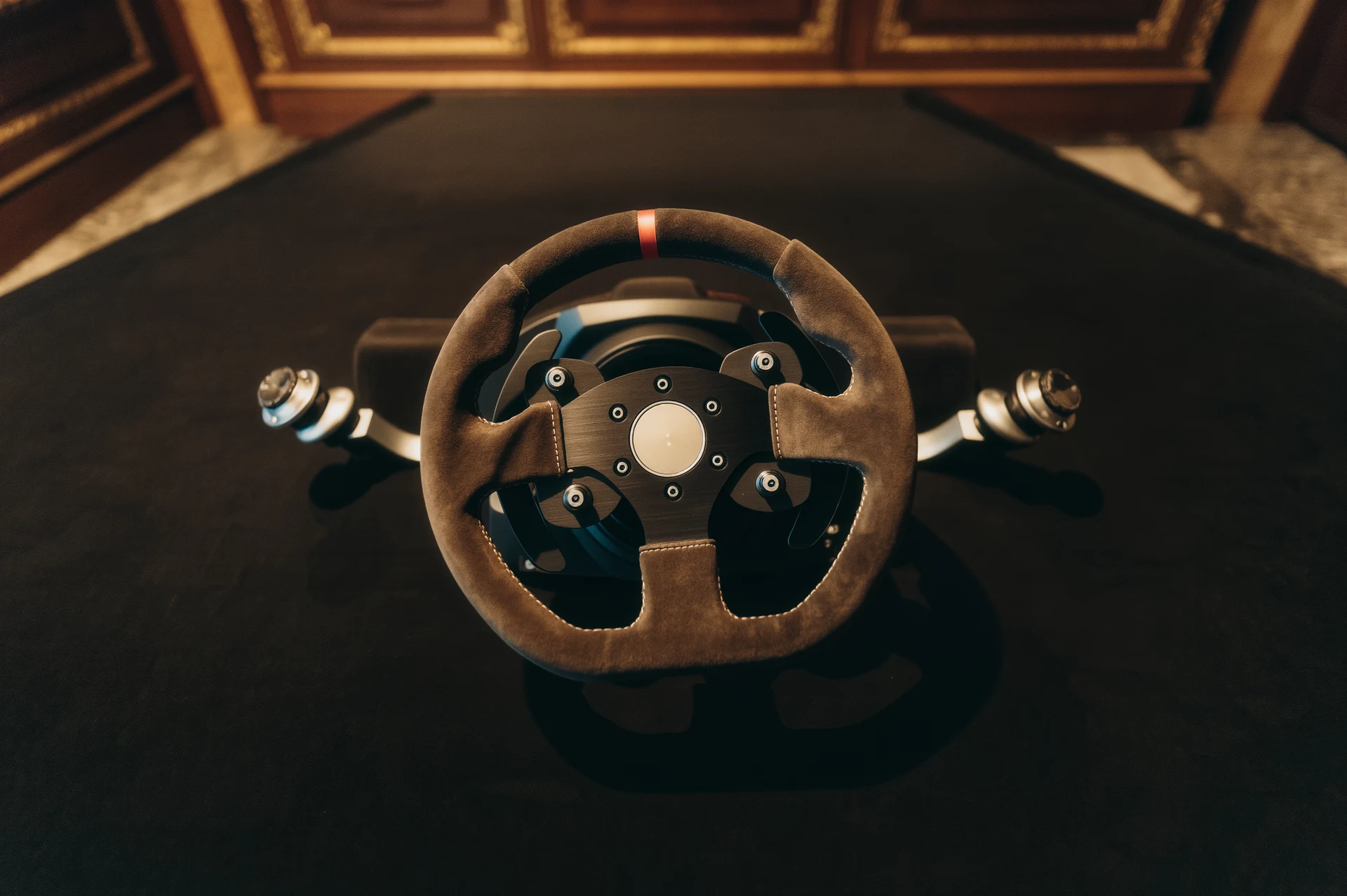
So, you want to master drifting with a steering wheel? The quick answer is: it’s all about fine-tuning your force feedback, wheel rotation, and pedal settings to mimic real-world car dynamics and provide the precise feedback you need to control slides. It’s less about buying the most expensive gear and more about understanding what each setting does and how it impacts your ability to feel and respond to the car. Think of it as preparing a musical instrument, the right setup allows for the best performance.
Why Your Steering Wheel Setup Matters for Drifting
Drifting isn’t just about holding down an accelerator and spinning out. It’s a delicate dance of weight transfer, throttle control, and counter-steering. Your steering wheel is your primary interface for this dance. A poorly configured wheel can feel vague, fight against you, or simply not provide the crucial information you need to catch and sustain a slide. A well-tuned setup, on the other hand, becomes an extension of your hands, making those nuanced corrections intuitive and almost telepathic. It’s the difference between wrestling a wild beast and gracefully guiding a powerful machine.
The Foundation: Your Hardware Considerations
Before diving into software settings, let’s briefly touch upon the hardware itself. While you don’t need a top-tier direct drive wheel to enjoy drifting, certain features make a significant difference.
Wheel Type: Gear, Belt, or Direct Drive?
- Gear-Driven Wheels (e.g. Logitech G29/G920): These are entry-level and common. They offer decent force feedback but can feel a bit notchy or grainy due to the gears. They’re a great starting point, but don’t expect the smoothest, most detailed feedback. You might need to be a bit more aggressive with your inputs to overcome some of the internal friction.
- Belt-Driven Wheels (e.g. Thrustmaster T300/TX, Fanatec CSL Elite): A step up, offering much smoother and more refined force feedback compared to gear-driven wheels. The belts absorb some of the harshness and provide a more continuous feel. Many serious drift enthusiasts find these to be an excellent balance of price and performance, offering enough fidelity to truly feel the car.
- Direct Drive Wheels (e.g. Fanatec DD series, Simucube, Moza): The pinnacle of sim racing hardware. These wheels connect directly to the motor, resulting in incredibly precise, detailed, and powerful force feedback with zero gear or belt artifacts. This level of detail is a game-changer for drifting, allowing you to feel every nuance of grip and slip. However, they come at a significantly higher price.
Pedals: Two or Three? Load Cell or Potentiometer?
- Two-Pedal Set (Throttle, Brake): If your primary focus is drifting, a two-pedal set can work, especially if you plan on using the handbrake for initiation.
- Three-Pedal Set (Throttle, Brake, Clutch): Highly recommended for realistic drifting. The clutch is essential for clutch kicks, rev matching, and managing engine braking, which are fundamental techniques in many drift styles. Don’t underestimate its importance.
- Potentiometer Pedals: Found in most entry-level sets. They measure pedal travel. They work, but consistency can be an issue, and they often lack feel.
- Load Cell Pedals (Brake): A huge upgrade, especially for the brake. Load cell pedals measure the force applied, not just the travel. This allows for much more consistent braking and trail braking, which is crucial for balancing the car during drift entry and mid-drift adjustments. While load cells are most impactful for braking, the general principle of precise input applies across all pedals.
Handbrake: Essential for Most
While not strictly part of the “steering wheel setup,” a dedicated analogue handbrake makes a world of difference for drifting. Trying to use a button on your wheel or a pedal for the handbrake is a frustrating compromise. An analogue handbrake allows for nuanced application, crucial for initiating slides, adjusting angles, and performing feints.
The Brains of the Operation: Software Settings
This is where the real magic happens. Most racing sims and games will have their own set of options, but the principles remain the same. We’ll break these down into general categories.
Global Wheel Driver Settings (Often in Windows or Manufacturer Software)
Before you even launch your game, check your wheel’s dedicated software (e.g. Logitech G Hub, Thrustmaster Control Panel, Fanatec FanaLab).
- Overall Force Feedback Strength: Start here. Don’t max it out immediately. Too strong can lead to clipping (where the FFB motor can’t reproduce the requested forces accurately) or simply make the wheel tiring to use. Aim for a level where you feel distinct forces without constant jarring. A good starting point is often around 70-80% of max. You want to feel detail, not just brute force.
- Damper/Friction/Inertia: These settings add resistance to the wheel’s movement.
- Damper: Adds a speed-dependent resistance, like pushing your hand through water. Too high can make the wheel feel sluggish and slow to self-correct during counter-steer. Too low can make it feel too light and twitchy.
- Friction: Adds a constant resistance, making the wheel feel heavier regardless of speed. Similar to damper, too much can impede quick corrections.
- Inertia: Simulates the mass of the wheel. Can make the wheel feel more “real” but too much can again slow down quick movements.
- Recommendation: For drifting, you generally want these settings relatively low to allow the wheel to rotate freely and quickly for counter-steering. Start with them off or at very low percentages and only add a little if the wheel feels too “floaty” or uncontrollable. The goal is rapid, uninhibited self-steering.
- Spring: Adds a centering force to the wheel. For drifting, you typically want this off or very low within your wheel’s driver settings, as the game’s force feedback should handle the centering. Having both active can conflict and produce an unnatural feel.
- Damping Filter / Smoothing: These can smooth out jagged force feedback signals. While useful in some cases, too much can introduce latency and mask subtle details crucial for feeling grip limits. For drifting, try to keep these as low as possible without the FFB feeling overly noisy or “chattering.” Precision over smoothness is often key here.
In-Game Force Feedback Settings: The Heart of the Experience
This is where you’ll spend most of your time tweaking. Every game’s FFB system is different, but the core concepts apply.
Overall Gain / Strength
- This is your main volume control for the in-game FFB. Adjust this so you feel strong, clear forces during corners and over bumps, but avoid feeling “buzzy” or harsh, which indicates clipping. If the wheel feels like it’s constantly hitting a wall or refusing to move, your gain might be too high. Use the FFB meter the game usually provides (if available) to ensure you’re not clipping too often. This is a crucial setting to get right before fine-tuning anything else. Aim to feel the detail without saturation.
Road Effects / Curb Effects
- These add feedback from the road surface and curbs. Set them to a level where they provide useful information without overwhelming other crucial feedback like slip. Too high can make the wheel feel constantly busy and mask the subtle cues of tire grip. Keep them audible, not dominant.
Slip / Understeer Effects
- These are vital for drifting. They communicate when the tires are losing grip.
- Understeer: When the front tires lose grip. The wheel will typically lighten up significantly. This feedback is critical for feeling when you’re pushing the front too hard.
- Slip: More general tire slip, often felt as a vibration or oscillation when tires are sliding. This helps you understand the limit.
- Recommendation: Set these at a level where you can distinctly feel them when tires break loose. This feedback is your primary guide for catching and sustaining a drift. Some games have separate “Slip” and “Understeer” effects, others combine them. Experiment to find what works best for your feeling of when grip is lost.
Damper / Friction / Inertia (In-Game)
- Similar to the global settings, but these are applied within the game’s physics.
- Recommendation: Again, for drifting, you generally want these low. The natural physics of the car and the forces generated by the tires should do most of the work. If the wheel feels like it’s fighting against your counter-steer, reduce these. If it’s too light and unstable, try adding a small amount back. The goal is for the wheel to respond quickly and allow for rapid self-correction without feeling robotic.
Minimum Force (Deadzone Removal)
- For wheels with weaker motors or a lot of internal friction, this setting can boost very small forces, helping you feel subtle details that might otherwise be lost in the wheel’s mechanical resistance. Only use if your wheel feels numb around the center or at low-speed corners. Too high and it can introduce unwanted oscillations. For stronger wheels, you might not need this much.
Angle of Rotation / Steering Lock
- This is arguably one of the most important settings for drifting.
- Realism vs. Practicality: In real drift cars, steering lock is often increased significantly compared to stock cars to allow for extreme angles. Most simulations will model this.
- Recommended Range: Start with something between 900 and 1080 degrees in your wheel’s global settings, then match that in the game. Some games automatically soft-lock the wheel to the car’s actual steering lock, which is ideal.
- Why it Matters: A wider steering angle allows for more precise control at high drift angles. If your wheel is set to, say, 540 degrees, you’ll run out of counter-steer much faster than a car with 900+ degrees of actual lock. However, too much (e.g. 1440 degrees) can make small corrections feel overly sensitive. Find a balance that feels natural to the car you’re driving and allows for full counter-steer without hitting the physical stop of your wheel too often. Often, setting your wheel’s rotation to a higher number (e.g. 900-1080) and letting the game’s “soft lock” feature handle the actual steering lock for individual cars is the best approach. This prevents you from fighting a physical stop.
Pedal Settings: Fine-Tuning Your Inputs
Your feet are just as important as your hands. Precise throttle and brake control are non-negotiable for drifting.
Throttle Sensitivity / Gamma
- Gamma: Affects the input curve. A default linear curve means 50% pedal travel equals 50% throttle.
- Lower Gamma (e.g. <1.0): Makes the initial part of the pedal travel less sensitive, then ramps up quickly. Good for cars that are very powerful and prone to wheel spin, allowing for finer control off-idle.
- Higher Gamma (e.g. >1.0): Makes the initial part more sensitive, then flattens out. Can be useful if you’re struggling to get enough throttle quickly, but generally less ideal for drift control where precise application is vital.
- Recommendation: Start with linear (gamma 1.0) and adjust based on car power and your feel. Many drifters prefer a slightly lower gamma (e.g. 0.8-0.9) to have more precise control over the initial throttle application, helping to manage wheel spin.
Brake Sensitivity / Gamma
- Load Cell Pedals: With load cell pedals, you want a linear response (gamma 1.0) and tune the brake force/pressure. The feel of a load cell is inherently linear to your foot’s force.
- Potentiometer Pedals: You might need to adjust gamma.
- Lower Gamma (e.g. <1.0): Makes the initial brake application less sensitive, then stronger. Can be useful if you tend to lock up easily.
- Higher Gamma (e.g. >1.0): Makes the initial brake application more sensitive. Generally less ideal for trail braking precision.
- Recommendation: Again, start with linear. For potentiometer pedals, prioritize control over the initial bite, as that’s often where mistakes happen.
Clutch Dead Zones
- Ensure your clutch input registers correctly. Set the upper and lower dead zones so that the clutch fully engages and disengages with your pedal travel. This is crucial for clutch kicks and smooth gear changes.
Putting it All Together: A Testing Process
Setting up your wheel isn’t a one-and-done deal. It’s an iterative process.
- Start Basic: Reset your wheel’s global driver settings to a conservative default (e.g. FFB 70-80%, Damper/Friction/Inertia low or off, Spring off). Set your wheel rotation to 900-1080 degrees.
- Launch Your Game: Go to your FFB settings.
- Overall Gain First: Drive normally (no drifting yet) and adjust the overall gain until you feel comfortable with the strength and detail, ensuring no excessive clipping.
- Angle of Rotation: Confirm the in-game steering lock feels natural for the car you’re driving. Most games will auto-adjust based on your global wheel setting if soft-lock is enabled.
- Test for Sliding (Slowly): Find an open area or a wide corner. Try to induce some oversteer.
- How does the wheel feel when grip is lost? Does it lighten up? Does it vibrate? Can you feel the car rotating?
- How quickly does the wheel self-correct? Is it too slow to spin into counter-steer, or too fast and uncontrollable? Adjust in-game damper/friction/inertia if it’s too slow.
- Do you feel the limits? If not, increase slip/understeer effects.
- Refine Pedals: Practice throttle control through corners, trying to maintain traction and then induce a slide. Adjust gamma as needed for precision.
- Handbrake Check: Ensure your handbrake is mapped correctly and provides analogue input (if applicable).
- Drift Time: Now, try to link some corners. Pay attention to:
- Entry: Are you getting the feedback you need from the front wheels?
- Mid-Drift: Can you make small, precise adjustments with the wheel?
- Catching: Does the wheel spin quickly enough for counter-steer, and do you feel the moment to apply full lock and then unwind?
- Iterate and Adjust: Make small changes, one setting at a time, and test. What feels good on one car might need slight tweaks for another within the same game. Take notes if you need to!
Common Pitfalls to Avoid
- Too Much Damping/Friction: This is probably the most common mistake for drift setups. It makes the wheel sluggish and prevents it from rapidly self-correcting. Less is often more here.
- Excessive Force Feedback Strength: Leads to clipping, loss of detail, and fatigue. Don’t chase high numbers; chase clarity and information.
- Ignoring Pedal Settings: Precise throttle isn’t just for racing; it’s fundamental to drift control.
- Not Using a Clutch: While possible, drifting without a clutch pedal is like trying to play guitar without an E-string, you’re missing a crucial tool for expression.
- Inconsistent Settings: Make sure your global wheel driver settings and in-game settings aren’t fighting each other (e.g. both adding spring or damping). Prioritize the in-game settings’ influence.
- Chasing Someone Else’s Settings: Use community settings as a starting point, but always tweak for your specific hardware and personal preference. What feels good to one person might not feel right to you.
Beyond the Settings: Practice and Feel
Ultimately, no amount of perfect settings will replace practice. The best setup provides the tools, but you need to learn how to use them. Pay attention to the subtle cues your wheel is giving you. Listen to the engine, feel the car’s rotation in your seat (if you have motion, or even just mentally), and continuously refine your inputs based on the feedback.
Mastering drift involves developing a “sixth sense” for what the car is doing. Your steering wheel setup is the crucial communication channel for that sense. Take the time to understand and fine-tune it, and you’ll unlock a new level of control and enjoyment in your virtual drifting journey. Happy sliding!
FAQs
What is a drift steering wheel setup?
A drift steering wheel setup is a specific configuration of a steering wheel and related components designed to enhance the performance and control of a vehicle during drifting maneuvers. This setup typically includes a smaller diameter steering wheel, a quick-release hub, and a deep dish design to allow for better leverage and control during drifting.What are the benefits of a drift steering wheel setup?
A drift steering wheel setup offers several benefits for drifters, including improved steering response, better control during high-speed maneuvers, and increased leverage for quick and precise steering inputs. The smaller diameter and deep dish design also provide a more ergonomic grip for the driver, allowing for better handling and control.How does a drift steering wheel setup differ from a standard steering wheel?
A drift steering wheel setup differs from a standard steering wheel in several key ways. It typically has a smaller diameter to allow for quicker steering inputs, a deep dish design to provide better leverage, and a quick-release hub for easy removal and installation. These features are specifically tailored to the demands of drifting and high-performance driving.Is a drift steering wheel setup legal for street use?
The legality of a drift steering wheel setup for street use varies depending on local regulations and laws. In some areas, modifications to the steering wheel may be subject to specific restrictions or requirements. It is important for drivers to check with local authorities and ensure that any modifications comply with applicable laws and regulations.How can I install a drift steering wheel setup?
Installing a drift steering wheel setup typically involves removing the existing steering wheel, installing a quick-release hub, and mounting the new drift steering wheel. It is important to follow the manufacturer’s instructions and ensure that the setup is installed securely and correctly to maintain safety and performance. If unsure, it is recommended to seek professional assistance for installation.More from Drifting

Virtual Drifting: A Thrilling Experience
Virtual drifting is, in short, a digital simulation of the high-skill, car-control sport of drifting. It’s about sliding a car through a turn, m…
Mastering Drifts: Professional Simulator Experience
So, you want to get good at drifting in a simulator, huh? The short answer is: it takes a lot of practice, the right equipment, and a solid understand…
Mastering the Art of Sim Racing Drifting
Let’s dive into the world of sim racing drifting. If you’re wondering how to actually drift in a simulator, it boils down to a controlled …